Vibe Coding: Prerequisites
Before you start the vibe coding trail, you need a few things in place.
The checklist
| # | What you need | Why | Status |
|---|---|---|---|
| 1 | GitHub Copilot | The AI that does the building | ✅ Required |
| 2 | VS Code | The editor where everything happens | ✅ Required |
| 3 | Git | Version control - stores your project and powers the deployment pipeline | ✅ Required |
| 4 | Node.js | The runtime that your web app and build tools need | ✅ Required |
| 5 | Azure CLI (az) |
Lets Copilot create and configure Azure resources on your behalf | ✅ Required |
| 6 | GitHub CLI (gh) |
Lets Copilot push to GitHub and set up the deployment pipeline | ✅ Required |
| 7 | An Azure resource group | The container in Azure where your app will live | ✅ Required |
| 8 | An App Registration | Needed only for step 16.5 (adding login) | ⏳ Can wait |
| 9 | Brave Copilot installed | The skills library that contains the vibe coding skills | ✅ Required |
The sections below walk through each item.
1-6: Software
These are covered in the software you need chapter. If you have already worked through that page, you are good. If not, do it now - the installation of some tools (particularly GitHub Copilot) requires manager approval, which can take time. Other apps will need permission from AFRY IT as they are not yet available in the application kiosk.
7: Azure resource group
A resource group is the container in Azure where your app and its services will live. You need one before you can deploy anything. The resource group will be need to be tagged with your name and with a cost center. The cost center is required because some features - such as talking to a LLM or storing data in a shared database - will be billed monthly. Read more [here]
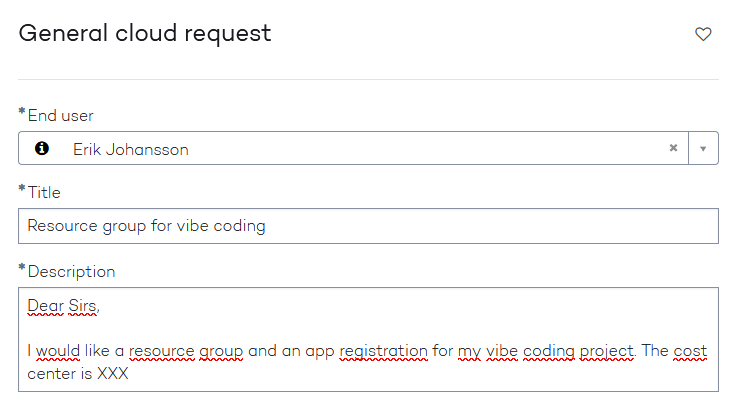
- Raise a "General Cloud Request" through the AFRY IT service desk
- Say: "I would like a resource group and an app registration for my vibe coding project. The cost center for the resource group is XXX"
You will receive the resource group name and the app registration name once they have been created.
9: Brave Copilot
The vibe coding skills live in the Brave Copilot repository - AFRY's inner-source library of Copilot skills.
If not installed, follow the installation instructions in the Brave Copilot chapter.
Costs
The vibe coding trail creates real Azure resources, and real Azure resources have real costs. The good news: for a small app used by a limited number of people, the monthly bill is very low - often just a few euros.
Here is what each step costs:
Static Web App (step 16.4 - deploy)
The Free tier covers most use cases and costs nothing:
| Tier | Monthly cost | What you get |
|---|---|---|
| Free | €0 | 100 GB bandwidth, up to 2 custom domains |
| Standard | ~€8 | Same, plus custom auth, extra features and SLA |
For a small internal tool with no login required, the free tier is sufficient. If you go through step 16.5 (adding AFRY login), you will need to upgrade to the Standard tier - custom authentication providers are not supported on the Free tier.
Shared database (step 16.6 - Cosmos DB serverless)
Cosmos DB serverless charges only for what you actually use - there is no minimum monthly fee and no charge when idle. The billing unit is the Request Unit (RU), which is a measure of the computing power used by each database operation.
| What you pay for | Price |
|---|---|
| Request Units consumed | ~€0.23 per million RUs |
| Storage | ~€0.23 per GB per month |
Example: A small team app with 1 000 operations per day (reads, writes, searches):
- ~30 000 operations/month × 5 RUs each = 150 000 RUs
- Cost: less than €0.05 per month
- Storage for a few thousand records: roughly €0.10 per month
- Total: under €0.20 per month
Even at 10x that usage - a busier app, more records - you are looking at €1-2 per month.
AI features (step 16.7 - Azure OpenAI)
Azure OpenAI charges per token - roughly three-quarters of a word. Both what you send to the model (input) and what it sends back (output) count.
| Model | Input | Output |
|---|---|---|
| GPT-4.1 | ~€1.84 per million tokens | ~€7.36 per million tokens |
| GPT-4o | ~€2.30 per million tokens | ~€9.20 per million tokens |
Example: 100 conversations per month, each about 500 tokens (a medium-length exchange):
- Total tokens: ~50 000
- Cost with GPT-4.1: ~€0.20
Even 1 000 conversations per month - a heavily used tool - costs ~€2 per month.
Total for the full trail
For a small internal team tool running all features (deployed, with auth, shared database, and AI):
| Component | Estimated monthly cost |
|---|---|
| Static Web App (Free tier) | €0 |
| Cosmos DB (low traffic) | < €0.50 |
| Azure OpenAI (light usage) | < €1.00 |
| Total | < €2 per month |
Costs scale with usage. If the app becomes popular and usage grows significantly, they can increase - but still typically remain modest for internal tools.
Setting a budget and watching costs
Azure makes it straightforward to set a spending limit and get notified before you exceed it.
To set a monthly budget:
- Open the Azure Portal and navigate to your resource group (search for the name of the resource group as given to you by AFRY IT)
- In the left menu, go to Cost Management - Budgets
- Click Add and set a monthly amount (e.g. €10)
- Add alert thresholds - for example, send an email at 80% and 100%
- Enter your email address as the recipient
Azure will email you when spending approaches your limit. Note that the budget alert is a notification only - it does not automatically stop the resources. To enforce a hard stop, you would need to involve AFRY IT.
To see what has been spent:
In your resource group, go to Cost Management - Cost analysis. You will see a breakdown by service, a daily chart, and a forecast for the rest of the month based on current usage. It is a clear, readable dashboard - no expertise needed.
Azure prices shown here are approximate EUR equivalents based on USD list prices. EUR amounts vary slightly month to month due to exchange rate updates. Use the Azure pricing calculator for precise current figures.
Final check
Once everything is in place, open a terminal in VS Code and run these four commands one by one. Each should return a version number - not an error:
When all four pass, you are ready to start 16.2a - Create your repository.